> For the complete documentation index, see [llms.txt](https://inflight.dope.security/llms.txt). Markdown versions of documentation pages are available by appending `.md` to page URLs; this page is available as [Markdown](https://inflight.dope.security/dope.console/dope.swg-policy/dopamine-dlp.md).
# Dopamine DLP
Dopamine DLP is our endpoint-native data loss prevention solution, built directly into the Fly Direct SWG. LLMs monitor and block sensitive uploads by understanding file context — no manual regex or pattern matching required. The result: real signals, fewer false positives, and enforcement that happens on-device with no stopovers.
### DLP Configuration
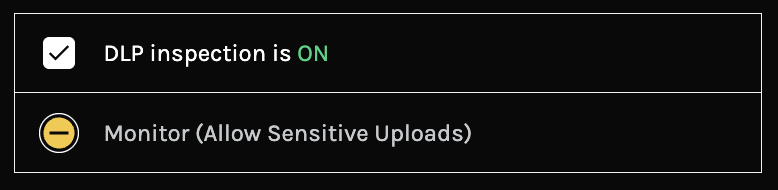
DLP is configured on a per-policy basis. To enable DLP inspection for a policy, navigate to the **DLP tab** within the policy and toggle **DLP Inspection** to ON from the right-hand panel.
### Configuration Modes
The Dope endpoint can be configured to either **Monitor** or **Block** when sensitive data in detected in an uploaded file or an AI Prompt.
**Monitor Mode** — On detection of sensitive data:
* The end user receives a notification that sensitive data was found and that the admin team has been informed
* A violation is logged in the Analytics section ([See more details here](/dope.console/analytics/detail-view.md))
* The upload is allowed to proceed
**Block Mode** — On detection of sensitive data:
* The end user receives a notification that sensitive data was found and that the admin team has been informed
* A violation is logged in the Analytics section ([See more details here](/dope.console/analytics/detail-view.md))
* The upload is blocked
{% hint style="info" %}
Block Mode is available exclusively to customers with a Dopamine DLP license. If you're running a POC and want to test this feature, contact .
{% endhint %}
#### DLP Policy Exceptions
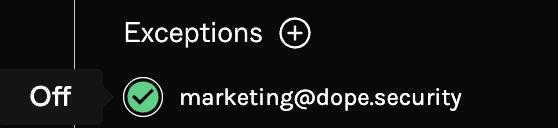
It is possible to create configuration mode exceptions for specific users or groups.
Admins can create configuration mode exceptions for specific users or groups, allowing them to operate under a different mode than the rest of the policy. For example, if a policy is set to **Block**, you could create an exception for the "Marketing" group to set their mode to **Monitor** — or disable DLP inspection entirely for that group.
### DLP URL Bypass
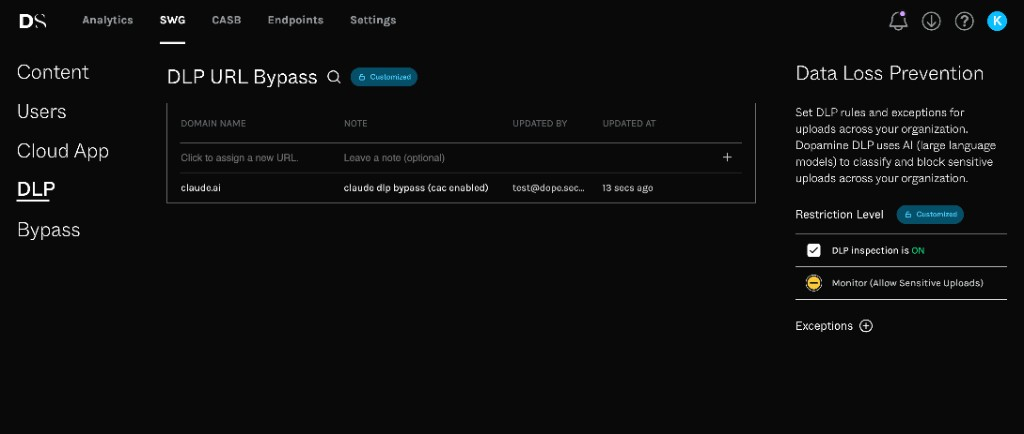
The DLP tab includes a **DLP URL Bypass** list for trusted destinations that do not need Dopamine DLP upload or prompt inspection.
DLP URL Bypass table in the DLP policy tab
When traffic matches an entry in this list, the endpoint skips DLP inspection for that request. The upload or prompt is allowed to continue, and no DLP violation is created for the bypassed request.
{% hint style="info" %}
A DLP URL bypass only applies to Dopamine DLP inspection. It does not bypass SSL inspection, add the destination to the SWG URL Bypass List, or change web category or Cloud Application Control decisions.
{% endhint %}
To add an entry:
* In the **DLP URL Bypass** table, click **Click to assign a new URL.**
* Enter a domain, URL with path, IPv4 address, or IPv6 address. Wildcard domains such as `*.example.com` are supported.
* Add an optional note explaining why the bypass is needed.
* Submit the row. The table records the entry, note, admin who updated it, and update time.
A domain entry applies to that destination and its paths. To bypass only part of a site, include the path in the entry. For example, `example.com/upload` bypasses DLP inspection for `example.com/upload` and child paths, but not for unrelated paths on `example.com`.
Custom policies can inherit the Base Policy DLP URL Bypass list or use their own customized list. To remove an entry, select it and delete it from the right-hand panel.
### Detections
When intercepting uploaded files or AI prompts, our LLMs scan for the following categories of sensitive data:
* Intellectual Property (**IP**)
* Payment Card Industry (**PCI**)
* Protected Health Information (**PHI**)
* Personally Identifiable Information (**PII**)
### Supported Applications
We're continuously adding new applications, including the latest AI tools. Currently supported applications include:
* **Google Drive** — When CAC is enabled, allowed domains are not inspected; all personal accounts are inspected
* **OneDrive** — When CAC is enabled, allowed domains are not inspected; all personal accounts are inspected
* **Box**
* **Dropbox**
* **ChatGPT** — Both prompt and file upload inspection supported
* **Anthropic/Claude support** - for the desktop application and other integrations, including CLI, VS Code, Cursor, Cowork, and Microsoft Add-ins. See here for details on how to get Claude Desktop to work with the dope.security certificate
* **Gemini**
* **Microsoft Copilot (browser)**
* **WeTransfer**
* **Perplexity AI (browser)**
{% hint style="info" %}
Don't see an application you need? Reach out to .
{% endhint %}
---
# Agent Instructions
This documentation is published with GitBook. GitBook is the documentation platform designed so that both humans and AI agents can read, navigate, and reason over technical content effectively. Learn more at gitbook.com.
## Querying This Documentation
If you need additional information that is not directly available in this page, you can query the documentation dynamically by asking a question.
Perform an HTTP GET request on the current page URL with the `ask` query parameter, and the optional `goal` query parameter:
```
GET https://inflight.dope.security/dope.console/dope.swg-policy/dopamine-dlp.md?ask=&goal=
```
`ask` is the immediate question: it should be specific, self-contained, and written in natural language.
`goal` is optional and describes the broader end goal you are ultimately trying to accomplish on behalf of the user. GitBook uses it to tailor the answer towards what is most useful for that goal.
The response will contain a direct answer to the question and relevant excerpts and sources from the documentation.
Use this mechanism when the answer is not explicitly present in the current page, you need clarification or additional context, or you want to retrieve related documentation sections.