> For the complete documentation index, see [llms.txt](https://inflight.dope.security/llms.txt). Markdown versions of documentation pages are available by appending `.md` to page URLs; this page is available as [Markdown](https://inflight.dope.security/dope.console/dope.swg-policy/cloud-application-control-cac/chatgpt.md).
# ChatGPT
### To configure ChatGPT, enter the list of Enterprise workspace IDS you want to allow access to.
{% hint style="info" %}
This control is limited to ChatGPT Enterprise customers.
{% endhint %}
Access to all other ChatGPT accounts will be blocked.
If a user tries to access the account that is that an Enterprise Account not in the allowed list, then a ChatGPT block page is shown:\
ChatGPT Tenant Restriction Error Modal
## Resolve certificate pinning message on macOS
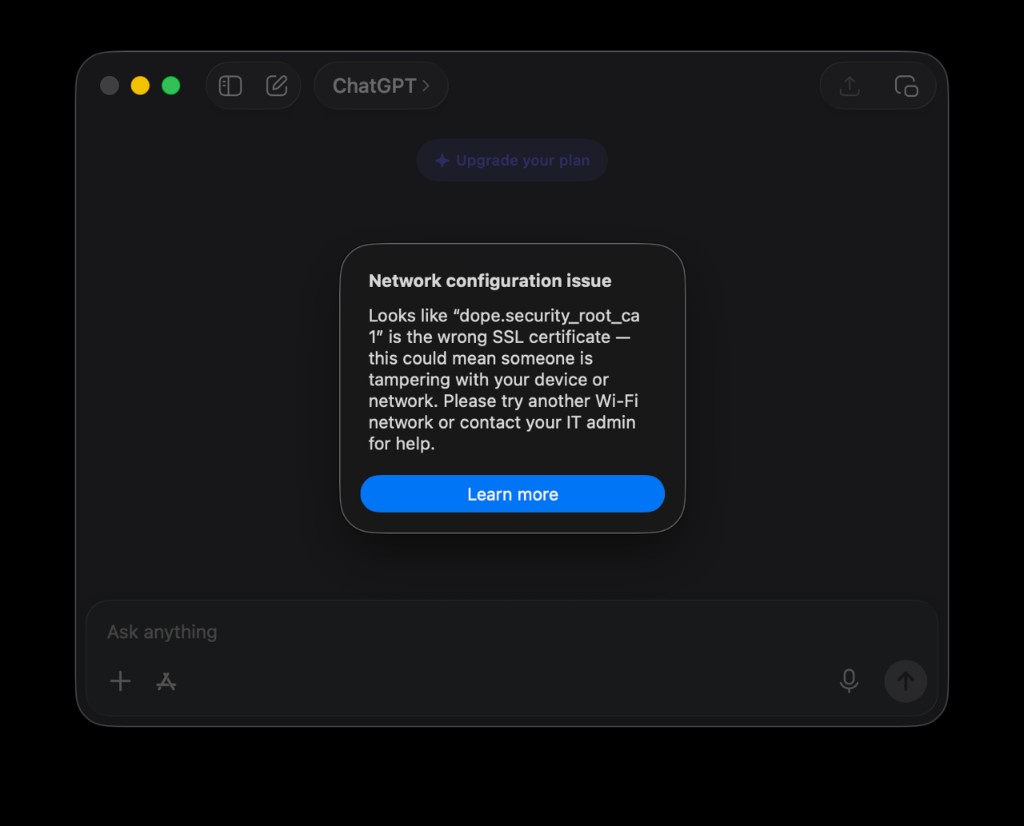
The ChatGPT macOS desktop app uses [certificate pinning](/dope.console/notifications/ssl-errors.md) and requires an extra step to work correctly. The app will show an error below until this is resolved:
ChatGPT blocked by certificate pinning when dope inspects its traffic
{% hint style="success" %}
To resolve, ChatGPT requires you to push an MDM profile with the certificate pinning exception. This adds the dope.security root CA to the `com.openai.pinned_cert_hash_list` so interception is honored on managed devices.
{% endhint %}
Deploy the MDM profile below (`com.openai.chat`) via MDM, scoped to all macOS devices. This will allow the dope.security root CA. Download the profile or copy the XML below.
{% file src="/files/RfbgNkIuAA1kdIIuRNvS" %}
```xml
PayloadContentPayloadTypecom.openai.chatPayloadIdentifiercom.openai.chat.6F319227-5470-486E-B3E0-05F94E6129CCPayloadUUID6F319227-5470-486E-B3E0-05F94E6129CCPayloadVersion1PayloadDisplayNameChatGPT Managed ConfigurationPayloadDescriptionAdds the dope.security root CA to the ChatGPT certificate pin exception list so TLS interception is honored on managed devices.com.openai.pinned_cert_hash_listiNWD5OB/39KJxie93dnbzXfmJjiM8unOxvVv6BlFXMM=PayloadTypeConfigurationPayloadVersion1PayloadIdentifiersecurity.dope.chatgpt.cert-pin-exceptionPayloadUUID873EDEBC-998C-4B8D-B99E-35C00EBAFC3CPayloadDisplayNameChatGPT – dope.security Certificate Pin ExceptionPayloadDescriptionAllows the ChatGPT desktop/mobile app to accept TLS interception by the dope.security secure web gateway by pinning the dope.security root CA SPKI hash.PayloadOrganizationdope.securityPayloadScopeSystemPayloadRemovalDisallowed
```
{% hint style="info" %}
Pinning is checked against every certificate up to the trusted root, so adding the dope.security root CA hash is sufficient. Multiple hashes can be listed to cover additional/test CAs.
{% endhint %}
---
# Agent Instructions
This documentation is published with GitBook. GitBook is the documentation platform designed so that both humans and AI agents can read, navigate, and reason over technical content effectively. Learn more at gitbook.com.
## Querying This Documentation
If you need additional information that is not directly available in this page, you can query the documentation dynamically by asking a question.
Perform an HTTP GET request on the current page URL with the `ask` query parameter, and the optional `goal` query parameter:
```
GET https://inflight.dope.security/dope.console/dope.swg-policy/cloud-application-control-cac/chatgpt.md?ask=&goal=
```
`ask` is the immediate question: it should be specific, self-contained, and written in natural language.
`goal` is optional and describes the broader end goal you are ultimately trying to accomplish on behalf of the user. GitBook uses it to tailor the answer towards what is most useful for that goal.
The response will contain a direct answer to the question and relevant excerpts and sources from the documentation.
Use this mechanism when the answer is not explicitly present in the current page, you need clarification or additional context, or you want to retrieve related documentation sections.